1. Before you start
Everything lives in the Developer console. In Bananaleaf, click Developers in the sidebar and the console opens in its own tab. Its sidebar has Build (one playground per API), Manage (API keys, webhooks, activity) and Docs.
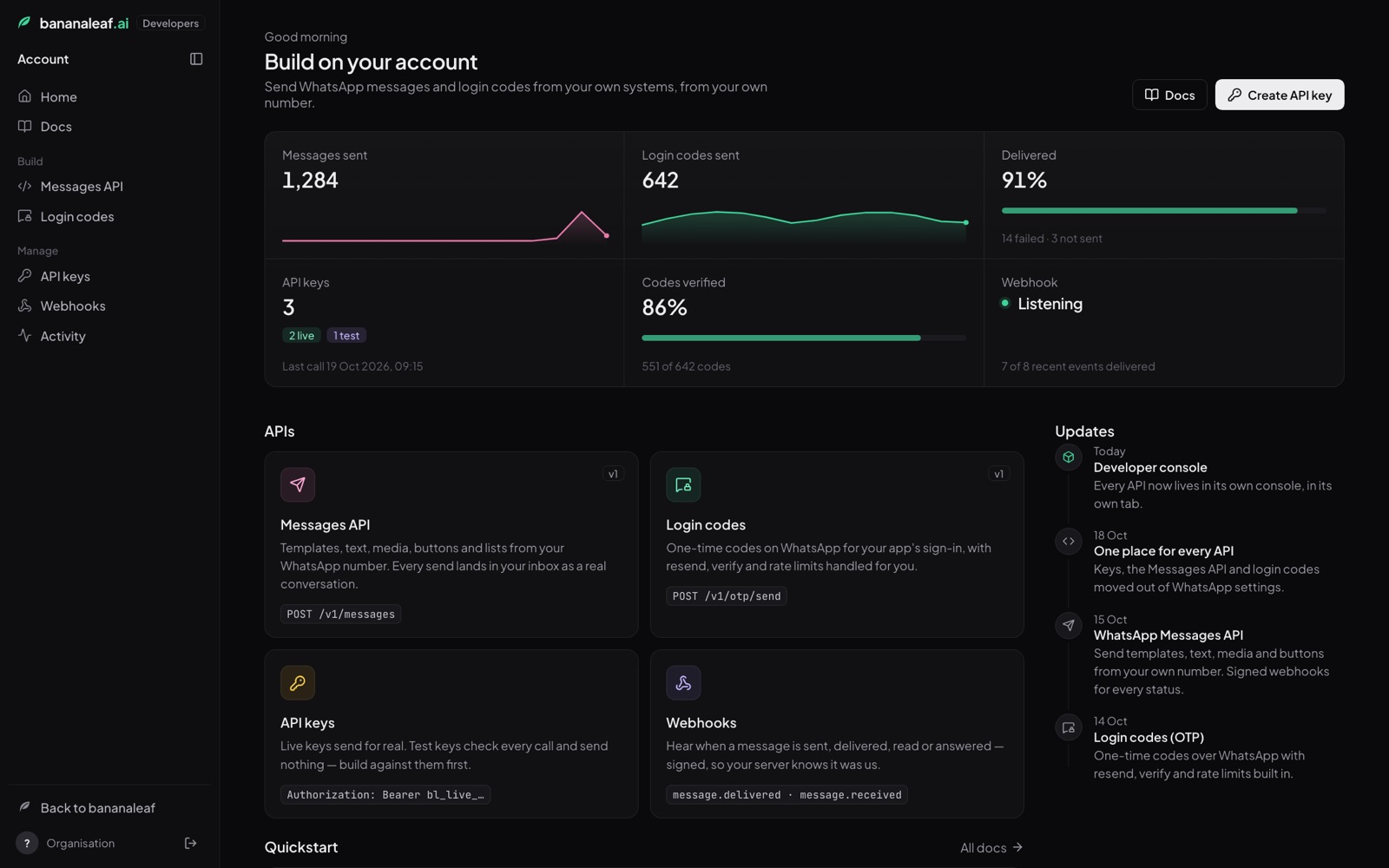
You need a WhatsApp number connected to your Bananaleaf account, at least one approved template, and a WhatsApp balance (template messages are billed, see Pricing).
The Messages API playground
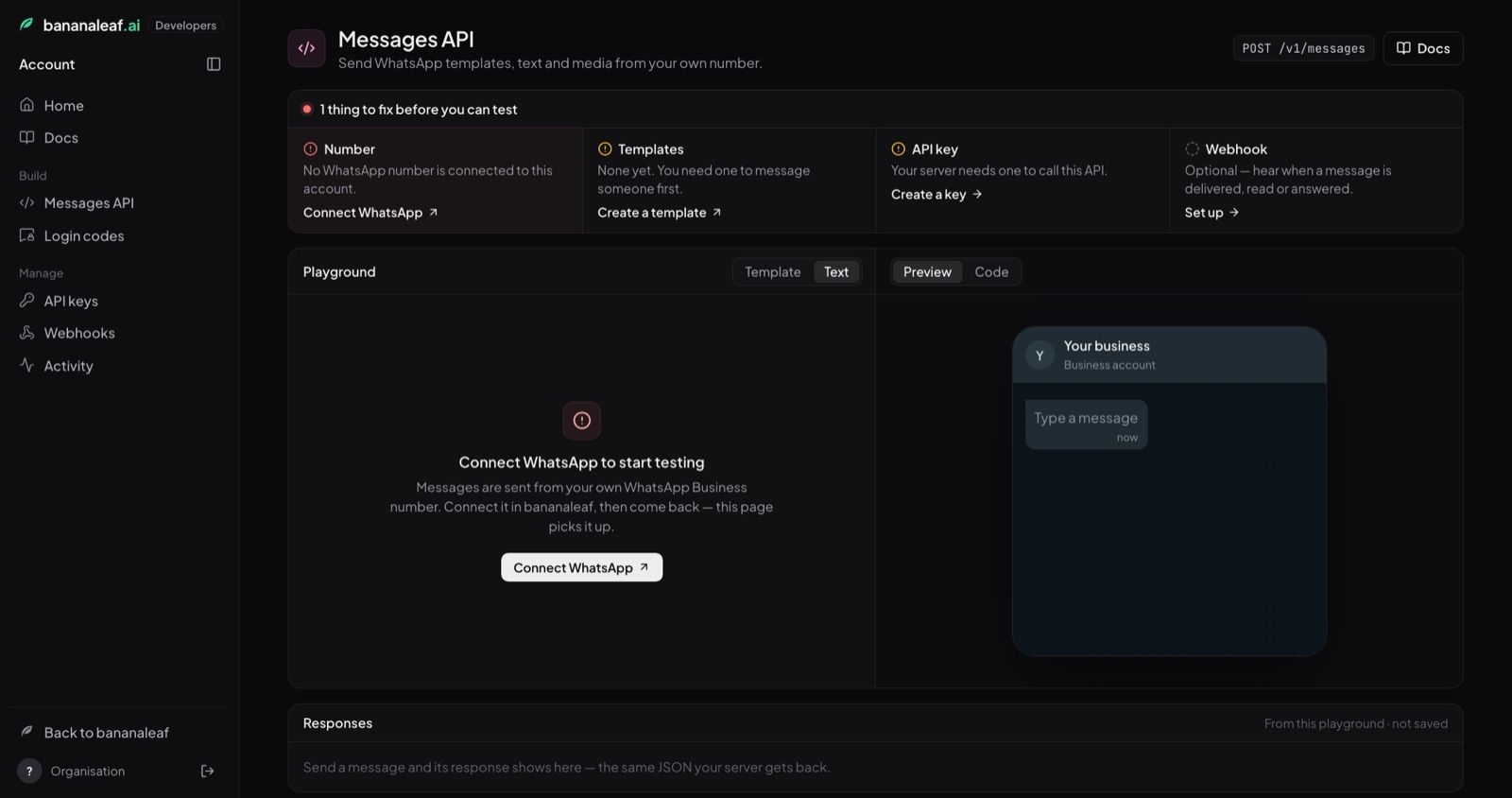
Open Build → Messages API. The strip at the top checks everything the API needs and says what to do about anything missing:
| Check | Ready when | If not |
|---|---|---|
| Number | a WhatsApp number is connected | Connect WhatsApp opens Bananaleaf in a new tab |
| Templates | at least one template is approved | Create a template, or Check with Meta now while one is in review |
| API key | there is a live key that can send messages | Create a key (see Your API key) |
| Webhook | optional | Set up (see Webhooks) |
Below it is the playground. Pick Template or Text, enter your own WhatsApp number, choose a template and fill in its variables. The Preview on the right shows exactly what will arrive; Code shows the same request in cURL, Node.js or Python, updated as you type, ready to paste into your server.
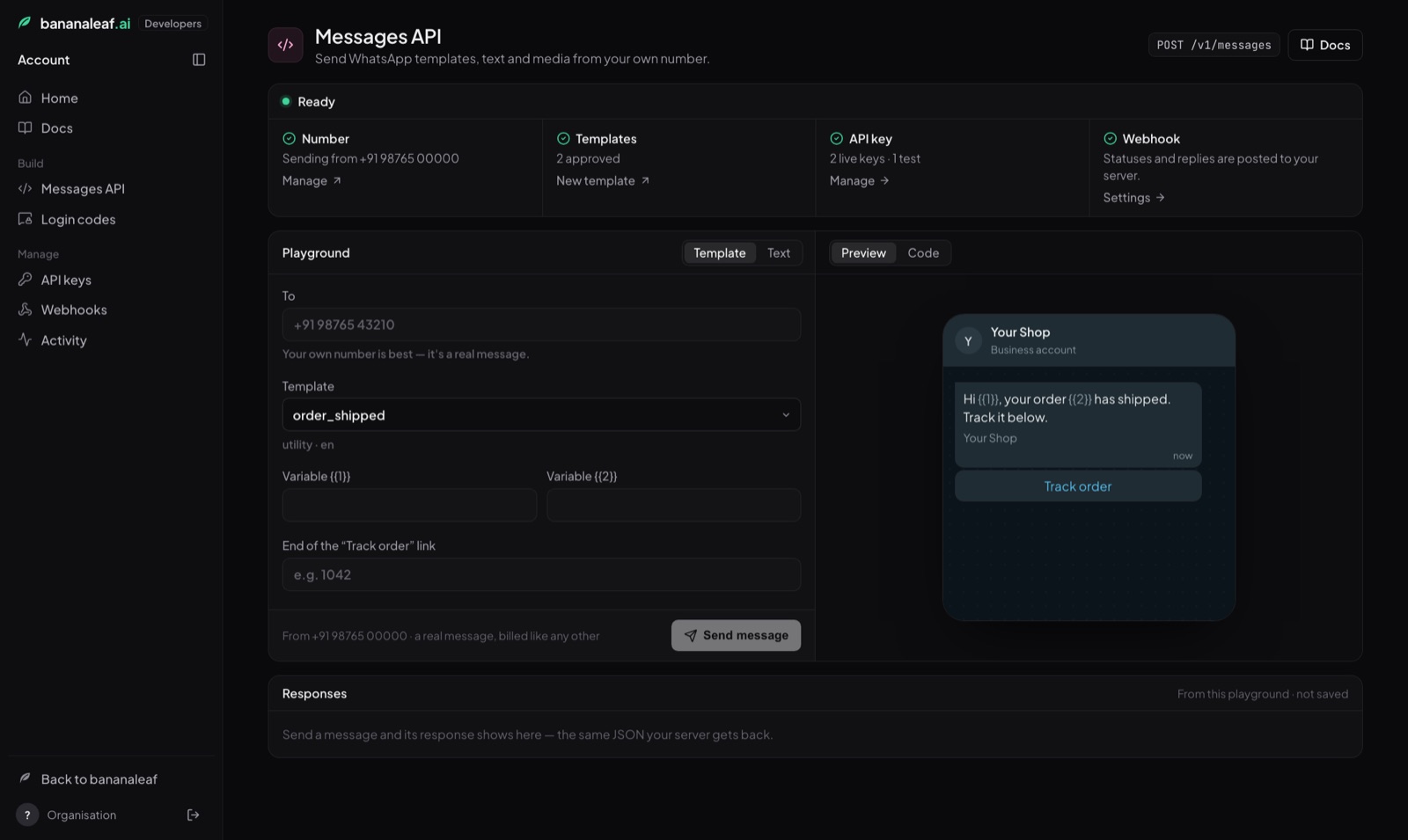
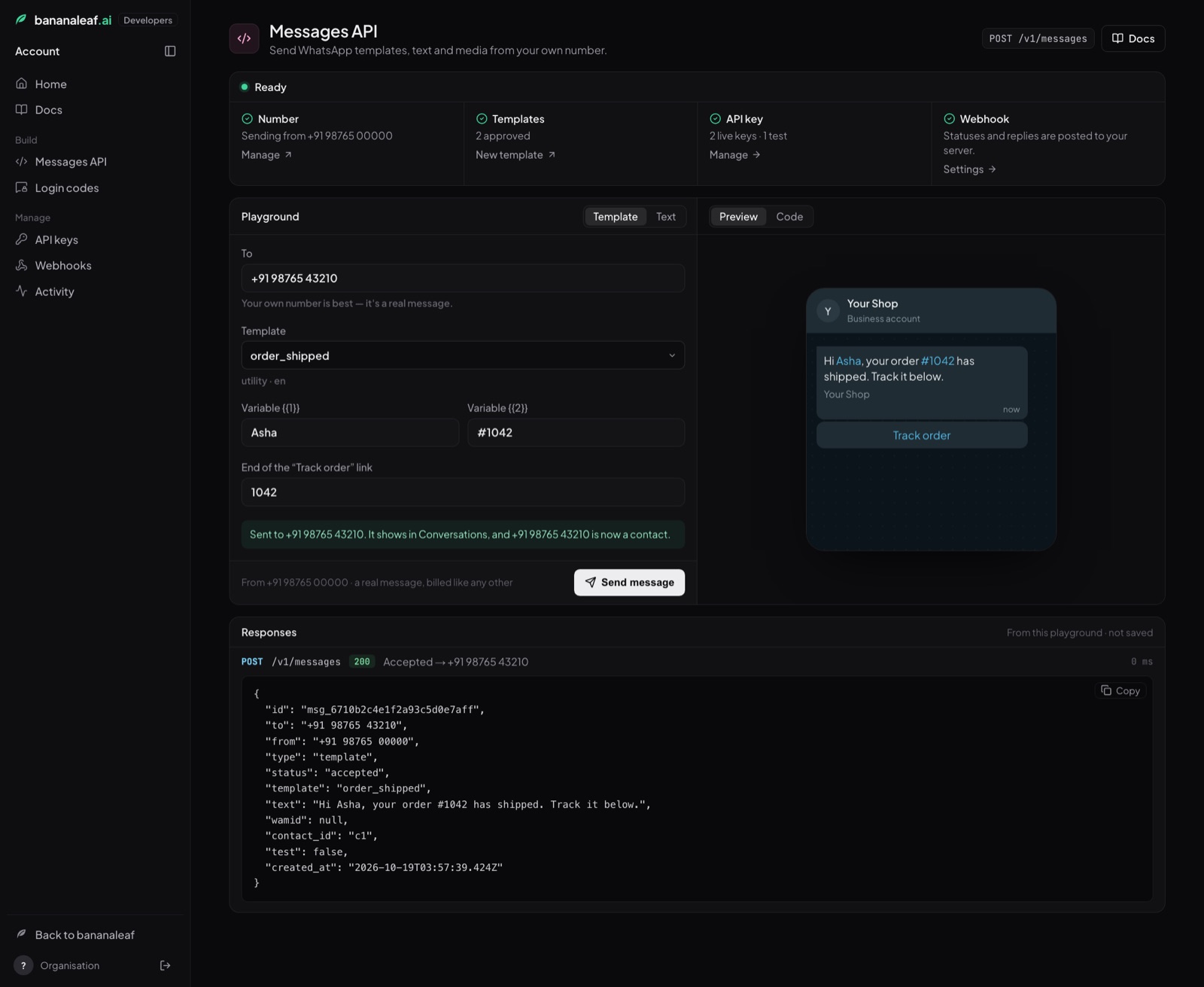
Press Send message. It is a real message, billed like any other. It appears in Conversations, and the number becomes a contact. Under Responses you see the JSON your server would get back; send more and each call is listed with its status and timing.
If something blocks a send, the playground says so in place of the form, with the one thing to do. With no approved template yet, it opens on Text, which needs none but only reaches a number that wrote to you in the last 24 hours.
API keys
Manage → API keys: press Create API key, type what it is for (e.g. Order updates) and pick Live (sends real messages, billed) or Test (checks every call but sends nothing, see Testing). The key opens in a window with a Copy key button; paste it into your server's settings. The list shows every key, what it can send and when it was last used. The copy button copies a key again any time; Revoke stops it immediately.
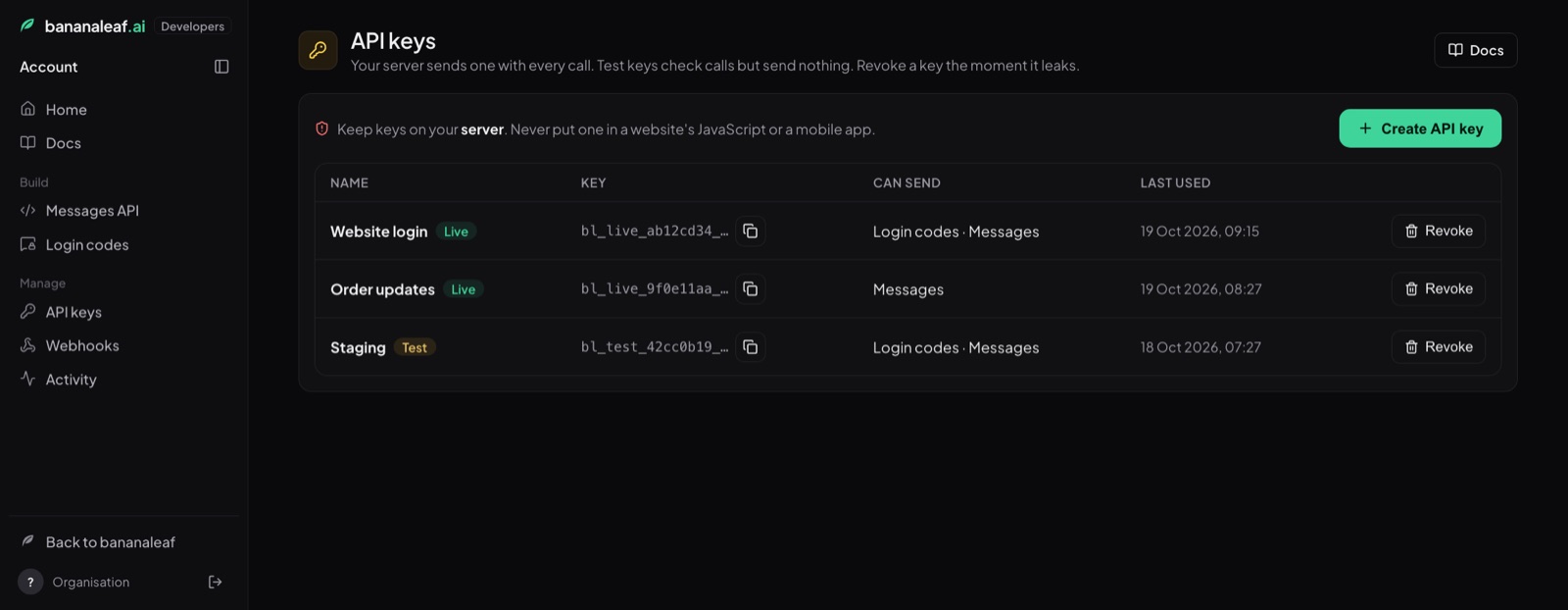
One key works for both messages and login codes. Keys made before 15 October 2026 can send login codes only (their Can send column says so) and have no copy button: only a fingerprint of them was ever kept. Create a new key for messages.
Webhooks and Activity
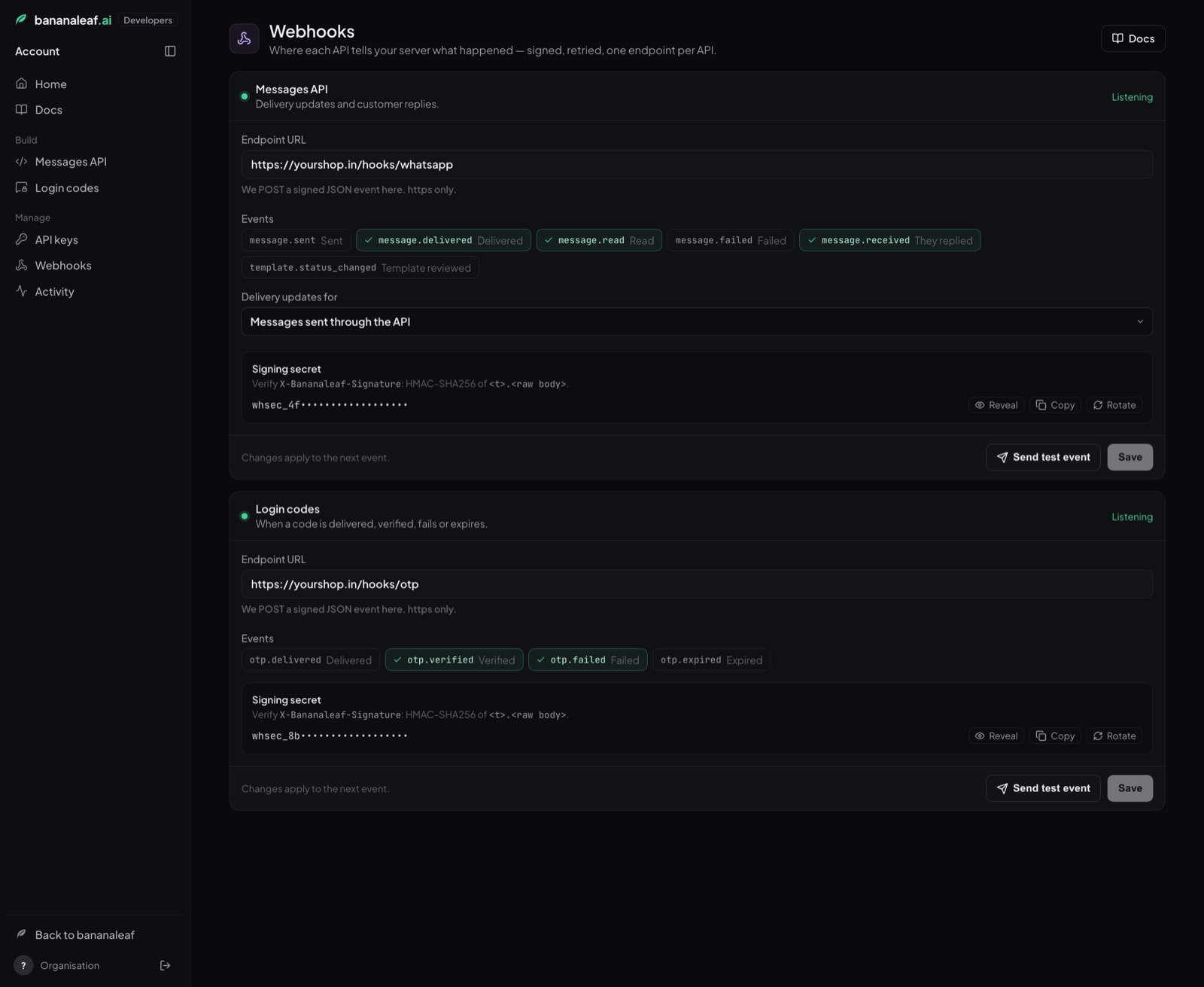
Manage → Webhooks is where you tell us your server's URL, pick the events you want, and copy the signing secret (see Webhooks).
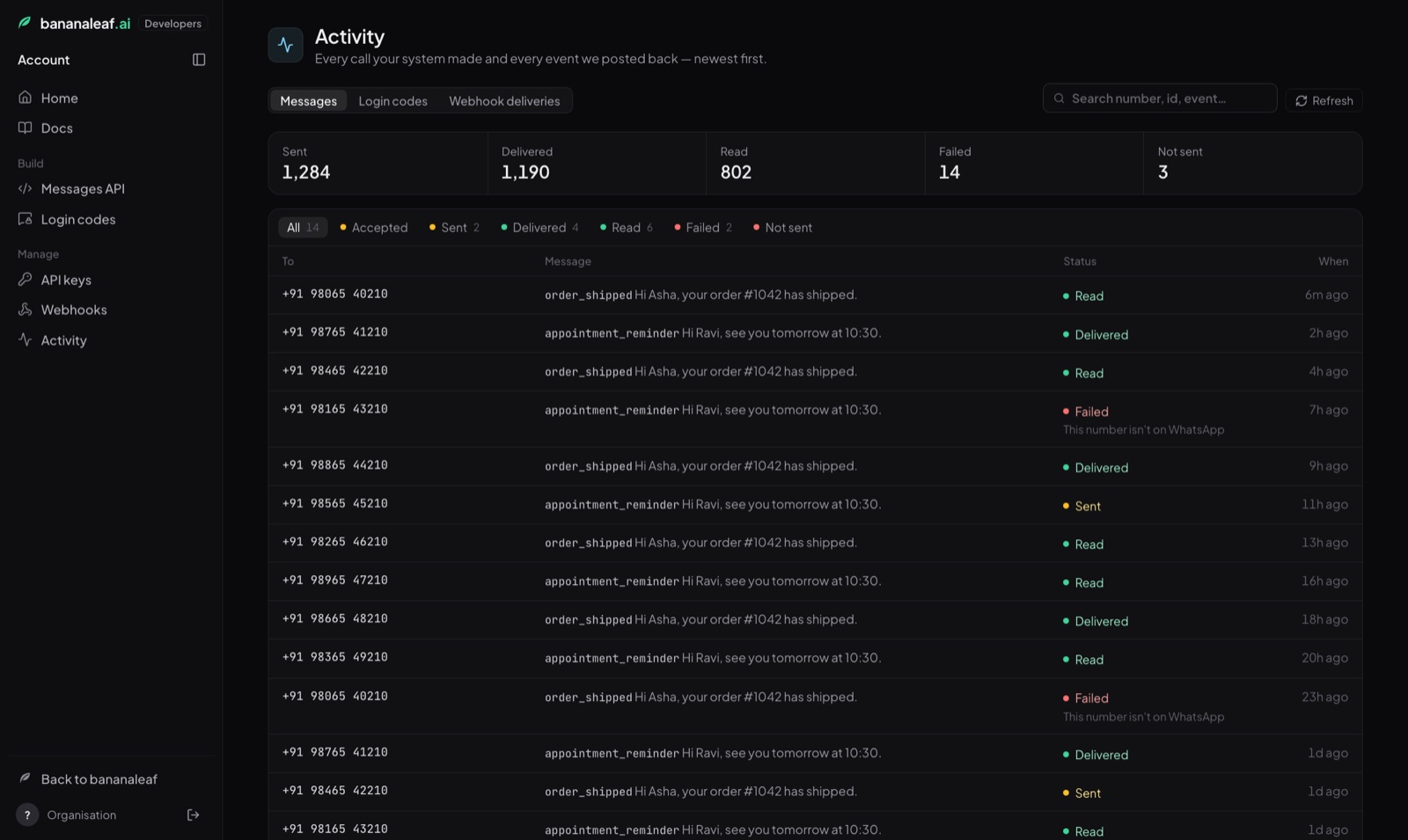
Manage → Activity lists the last 100 messages sent through the API with their status, and every webhook event we posted to your server with its result. Filter by status, search by number or id, and click a row for the full record.
2. Your API key
Authorization: Bearer bl_live_ab12cd34_xxxxxxxxxxxxxxxxxxxxxxxxxxxxxxxxxxxxxxxx| Key | Starts with | What it does |
|---|---|---|
| Live | bl_live_ |
Sends real WhatsApp messages. Billed. |
| Test | bl_test_ |
Goes through every check but sends nothing and saves nothing. Use it while building and in your automated tests. |
- You can copy a key again under Developers → API keys any time. It is stored encrypted, and every copy is recorded. Keys made before 15 October 2026 can't be copied again.
- Revoke a key on the same page. Anything using it stops working immediately.
- An account can hold up to 10 active keys, e.g. one per system or environment.
- A missing, wrong or revoked key gets
401with{"detail": "Invalid or missing API key."}. - A key without the messaging permission (an old key that can send Login codes only) gets
403scope_missing.
Keep the key on your server. Never put it in a website's JavaScript or a mobile app. Anyone who finds it can message your customers from your number, and Meta restricts numbers that send spam.
3. How WhatsApp messaging works
WhatsApp has two kinds of business message, and which one you may send depends on when the customer last wrote to you.
| Template | Free-form (text, media, buttons, lists…) | |
|---|---|---|
| When | Any time | Only within 24 hours of the customer's last message to you |
| Content | Fixed wording, approved by Meta in advance, with {{1}}-style variables you fill per message |
Anything you like |
| Use it for | Starting a conversation, order and delivery updates, reminders, offers | Replying to a customer who just wrote to you |
| Cost | Billed per delivered message | Free |
So the usual pattern is: send a template to start, and once the customer
replies, you have 24 hours to send anything. Every time they write again, the
24 hours start over. A free-form message outside the window is refused with
409 window_closed. Send a template instead.
Messages you send through the API are part of your Bananaleaf inbox. The person you message becomes a contact (found by phone number, or created), the message appears in their WhatsApp conversation in Bananaleaf, and their reply lands there too, so your team can see and continue any conversation your system started. Your AI agent's settings apply to those conversations exactly as to any other.
4. Send a message
POST /v1/messages
One endpoint for every kind of message. type says which.
Fields every message takes
| Field | Type | Required | Notes |
|---|---|---|---|
to |
string | yes | Full international number: +919876543210. Spaces, dashes and brackets are ignored; a 00 prefix is accepted. A number without a country code is refused. |
type |
string | yes | template, text, image, video, audio, document, sticker, location, buttons, list or cta_url. See Message types. |
from |
string | no | Which of your WhatsApp numbers sends it: the number (+918897775605), its id or phone_number_id from GET /v1/numbers. Leave it out if you have one number. |
reply_to |
string | no | The wamid of a message in this chat. WhatsApp shows your message as a reply to it. Free-form messages only. |
name |
string | no | The person's name, saved on the contact if it has none yet. Never overwrites a name already on file. |
metadata |
object | no | Up to 20 keys of your own (e.g. {"order_id": "1042"}), returned on this message and in every webhook about it. |
Header (optional): Idempotency-Key: <your unique id>. If your server
retries a call with the same key, you get the same message back and no
second message goes out. Reusing a key for a different number is 409 idempotency_key_reused. Use something tied to the event, like
order-1042-shipped.
Reply 200 (the message, see Check a message for every field)
{
  "id": "msg_6710b2c4e1f2a93c5d0e7a11",
  "to": "+919876543210",
  "from": "+918897775605",
  "type": "template",
  "status": "sent",
  "template": "order_shipped",
  "text": "Hi Asha, your order #1042 has shipped.",
  "media_url": null,
  "wamid": "wamid.HBgMOTE5ODc2NTQzMjEwFQIAERgSQjM4...",
  "contact_id": "6710b2c4e1f2a93c5d0e7a0f",
  "source": "api",
  "error": null,
  "metadata": { "order_id": "1042" },
  "test": false,
  "created_at": "2026-10-15T09:30:00.120000+00:00",
  "sent_at": "2026-10-15T09:30:00.640000+00:00",
  "delivered_at": null,
  "read_at": null,
  "failed_at": null
}
status is sent when WhatsApp has accepted the message. Delivery and reading
come later, by webhook or by checking the message.
Keep the id.
When it can't be sent you get an error (see Errors). If we had
already recorded the message, the error carries its message_id so you can look
it up:
{
  "error": "not_on_whatsapp",
  "message": "This number can't receive WhatsApp messages.",
  "provider_code": 131026,
  "message_id": "msg_6710b2c4e1f2a93c5d0e7a12"
}5. Message types
Template
Starts a conversation, any time. template.name is your approved template's
name. variables fills its {{1}}, {{2}} … either as a list in order or
as an object by number.
{
  "to": "+919876543210",
  "type": "template",
  "template": {
    "name": "order_shipped",
    "language": "en_US",
    "variables": ["Asha", "#1042"],
    "header": { "url": "https://cdn.yourshop.in/orders/1042.jpg" },
    "buttons": [
      { "index": 0, "url_suffix": "1042" },
      { "index": 1, "payload": "stop-updates-1042" }
    ]
  }
}| Field | Required | Notes |
|---|---|---|
template.name |
yes | The template's name, e.g. order_shipped. |
template.language |
no | Only needed if you have the same template in several languages, e.g. en_US, hi. |
template.variables |
when it has variables | ["Asha", "#1042"] or {"1": "Asha", "2": "#1042"}. One value per variable, none empty. WhatsApp rejects a value containing a new line, a tab or four spaces in a row. |
template.header.url |
when the header is an image, video or document | An https link to the file for this message. If you attached a default file to the template in Bananaleaf, you can leave it out and that file is used. |
template.header.text |
when the header text has a {{1}} |
The header's value. |
template.buttons |
for some buttons | A link button whose address ends in {{1}} needs {"index": n, "url_suffix": "…"}. A quick-reply button may carry a payload you get back when they tap it. A copy-code button needs {"index": n, "coupon_code": "…"}. index is the button's position, from 0. |
GET /v1/templates/{name} tells you exactly which of these a
template needs (variables, header.needs_value, buttons[].needs_value).
One-time login codes use their own API. See the
WhatsApp OTP API. Sending an authentication template here
is refused with 409 use_otp_api.
Text
Inside the 24-hour window only.
{ "to": "+919876543210", "type": "text", "text": "Your rider is 5 minutes away." }Or, to show a preview card for the first link in the message:
{ "to": "+919876543210", "type": "text",
  "text": { "body": "Track it here: https://yourshop.in/t/1042", "preview_url": true } }
Up to 4,096 characters. WhatsApp formatting works: *bold*, _italic_,
~strike~, ```mono```.
Image, video, audio, document, sticker
Inside the 24-hour window only. Send a public https link to the file. We pass it to WhatsApp, which downloads it.
{ "to": "+919876543210", "type": "image",
"image": { "url": "https://cdn.yourshop.in/receipt-1042.jpg", "caption": "Your receipt" } }{ "to": "+919876543210", "type": "document",
"document": { "url": "https://cdn.yourshop.in/invoice-1042.pdf",
"filename": "Invoice-1042.pdf", "caption": "Your invoice" } }| Type | Files WhatsApp accepts | Max size | Caption |
|---|---|---|---|
image |
JPEG, PNG | 5 MB | yes |
video |
MP4, 3GP | 16 MB | yes |
audio |
AAC, MP3, MP4 audio, AMR, OGG (opus) | 16 MB | no |
document |
any (PDF, DOCX, XLSX…) | 100 MB | yes, plus filename |
sticker |
WebP | 100 KB static, 500 KB animated | no |
Captions are up to 1,024 characters. The file also shows in the Bananaleaf conversation.
Buttons
Up to 3 reply buttons under a message. Inside the 24-hour window only.
{
  "to": "+919876543210",
  "type": "buttons",
  "buttons": {
    "header": "Delivery tomorrow",
    "body": "Will you be home between 10 am and 1 pm?",
    "footer": "Reply to reschedule",
    "buttons": [
      { "id": "home-yes", "title": "Yes, I'll be home" },
      { "id": "home-no", "title": "No, reschedule" }
    ]
  }
}bodyup to 1,024 characters;headerandfooterup to 60.headermay instead be media:{"type": "image", "url": "https://…"}(orvideo,document).- Each button:
titleup to 20 characters;idup to 256 (defaults to the title). Ids must differ. - When the customer taps one, you get a
message.receivedevent withtype: "button"and the button'sidasbutton.payload.
List
A menu of up to 10 rows, opened by one button. Inside the 24-hour window only.
{
  "to": "+919876543210",
  "type": "list",
  "list": {
    "body": "Pick a delivery slot for tomorrow.",
    "button": "See slots",
    "sections": [
      { "title": "Morning", "rows": [
        { "id": "slot-9", "title": "9 – 11 am" },
        { "id": "slot-11", "title": "11 am – 1 pm", "description": "Most popular" }
      ]},
      { "title": "Evening", "rows": [
        { "id": "slot-17", "title": "5 – 7 pm" }
      ]}
    ]
  }
}button(the label that opens the list) up to 20 characters.- Up to 10 sections and 10 rows in total. Row
titleup to 24 characters,descriptionup to 72. - With more than one section, each needs a
title(up to 24). - A choice comes back as
message.receivedwithtype: "button"and the row'sid.
Link button (cta_url)
One button that opens a web address. Inside the 24-hour window only.
{
  "to": "+919876543210",
  "type": "cta_url",
  "cta_url": { "body": "Your order is on its way.", "button": "Track order",
               "url": "https://yourshop.in/t/1042" }
}Location
{ "to": "+919876543210", "type": "location",
  "location": { "latitude": 17.4326, "longitude": 78.4071,
"name": "Yourshop Banjara Hills", "address": "Road No. 12, Hyderabad" } }Replying to a specific message
Add reply_to with the wamid of their message (from the
message.received webhook) and WhatsApp shows yours as a
quoted reply:
{ "to": "+919876543210", "type": "text", "text": "Yes, it ships today.",
"reply_to": "wamid.HBgMOTE5ODc2NTQzMjEwFQIAEhggQUY5..." }6. Check a message
GET /v1/messages/{id}
curl https://api.bananaleaf.ai/v1/messages/msg_6710b2c4e1f2a93c5d0e7a11 \
  -H "Authorization: Bearer $BANANALEAF_KEY"
Returns the message in the same shape as the send reply.
| Field | Meaning |
|---|---|
id |
Our id for the message: msg_…. |
to, from |
The customer's number and your number. |
type |
The message type you sent. |
status |
Where it is now. See below. |
template |
The template's name, or null. |
text |
The text that was sent: a template with its variables filled in, or the message/caption. |
media_url |
The file sent, if any. |
wamid |
WhatsApp's own id for the message. Replies and webhooks refer to it. |
contact_id |
The Bananaleaf contact it went to. |
source |
api for messages sent through this API. |
error |
{"code", "message"} when it failed or wasn't sent, else null. |
metadata |
What you sent in metadata. |
created_at, sent_at, delivered_at, read_at, failed_at |
When each happened (ISO 8601, UTC). |
status values
| Status | Meaning |
|---|---|
sent |
WhatsApp accepted it. |
delivered |
It reached the customer's phone. |
read |
They opened it (only if they haven't turned read receipts off). |
failed |
WhatsApp couldn't deliver it. error says why. |
not_sent |
We didn't send it (e.g. they opted out, or the balance ran out). error says why. |
accepted |
Recorded, not handed to WhatsApp yet (rare and brief). |
Another account's message id returns 404.
7. Numbers
GET /v1/numbers
The WhatsApp numbers your key can send from. Use one in from when you have
more than one.
{
  "numbers": [
    {
      "id": "6700a1b2c3d4e5f6a7b8c9d0",
      "number": "+918897775605",
      "name": "Yourshop",
      "phone_number_id": "612345678901234",
      "default": true,
      "connected": true
    }
  ]
}
With several numbers and no from, the one marked default sends. If none
is marked, the call is refused with 409 choose_number and the list, so
nothing ever goes out from a number you didn't mean.
8. Templates
GET /v1/templates
Your templates, newest first, with everything a send needs. ?status=approved
lists only the ones you can send now.
{
  "templates": [
    {
      "id": "6700a1b2c3d4e5f6a7b8c9d1",
      "name": "order_shipped",
      "language": "en_US",
      "category": "utility",
      "status": "approved",
      "rejection_reason": null,
      "body": "Hi {{1}}, your order {{2}} has shipped. Track it below.",
      "variables": ["1", "2"],
      "header": { "format": "image", "text": null, "needs_value": false,
                  "default_url": "https://cdn.bananaleaf.ai/…/banner.jpg" },
      "footer": "Yourshop",
      "buttons": [
        { "index": 0, "type": "url", "text": "Track order", "needs_value": true },
        { "index": 1, "type": "quick_reply", "text": "Stop updates", "needs_value": false }
      ],
      "number": "+918897775605",
      "created_at": "2026-10-01T10:00:00+00:00"
    }
  ]
}status:approved(sendable),pending(Meta is reviewing),rejected(rejection_reasonsays why),paused(Meta paused it for low quality).header.needs_value/buttons[].needs_value:truemeans every send must supply that value.- Login-code templates are not listed. They belong to the OTP API.
GET /v1/templates/{name}
One template by name. If you have it in several languages you get
{"versions": [ … ]}.
POST /v1/templates: create a template
Creates a template and sends it to Meta for review straight away. Review
usually takes minutes, sometimes up to 24 hours. The
template.status_changed webhook tells you the result.
{
  "name": "order_shipped",
  "category": "utility",
  "language": "en_US",
  "header": { "type": "image", "url": "https://cdn.yourshop.in/banner.jpg" },
  "body": "Hi {{1}}, your order {{2}} has shipped. Track it below.",
  "examples": ["Asha", "#1042"],
  "footer": "Yourshop",
  "buttons": [
    { "type": "url", "text": "Track order", "url": "https://yourshop.in/t/{{1}}",
      "example": "https://yourshop.in/t/1042" },
    { "type": "quick_reply", "text": "Stop updates" }
  ]
}| Field | Required | Rules |
|---|---|---|
name |
yes | Lowercase letters, digits and _ only, e.g. order_shipped. Must be new. Meta blocks a deleted name for 30 days. |
category |
no | utility (default) or marketing. See below. |
language |
no | en_US (default), en, hi, te, … |
body |
yes | Up to 1,024 characters. Variables are {{1}}, {{2}} … numbered in order. It can't start or end with a variable. Put words before and after. |
examples |
when the body has variables | One realistic sample value per variable. Meta reviews the template with them. |
header |
no | {"type": "text", "text": "…"} (up to 60 characters, at most one {{1}} plus "example") or {"type": "image" | "video" | "document", "url": "https://…"}. A media header's url is a sample Meta reviews and the default file for sends: JPEG/PNG, MP4 or PDF, up to 16 MB. |
footer |
no | Up to 60 characters, no variables. |
buttons |
no | Up to 10: quick_reply (text), url (text, url, which may end in {{1}} with a full example), phone_number (text, phone_number). At most 2 link buttons and 1 call button. Button text up to 25 characters. |
The reply is the template (as in the list above) with status: "pending".
Utility or marketing? Meta decides, and may change your choice. Utility is for something the customer is already expecting: an order, booking, payment, delivery or account update. Marketing is anything that promotes: offers, new products, invitations, "come back". Marketing messages cost more, and WhatsApp limits how many a person receives from all businesses. Wording that sounds promotional in a utility template gets it re-categorised to marketing. A category can't be changed after approval; create a new template instead.
Common reasons Meta rejects a template: variables at the very start or end;
too many variables for too little text; a sample value that doesn't fit
({{1}} = "Asha" but the text reads "your order {{1}}"); spelling mistakes or
shouting in capitals; asking for card numbers or passwords; a link shortener
(bit.ly) instead of your own domain; content WhatsApp's commerce policy forbids.
Login-code (authentication) templates can't be created here. Meta writes their wording; create them in the developer console under Build → Login codes.
DELETE /v1/templates/{name}
Deletes the template here and at Meta (every language). Messages already sent are unaffected. The name can't be reused for 30 days.
{ "deleted": true, "name": "spring_sale" }9. Webhooks
Set a webhook under Developers → Webhooks and we POST a signed JSON event to your server as things happen. Choose which events you want.
| Event | When |
|---|---|
message.sent |
WhatsApp accepted a message you sent. |
message.delivered |
It reached the customer's phone. |
message.read |
They opened it. |
message.failed |
WhatsApp couldn't deliver it. |
message.received |
The customer wrote to you (text, a button tap, a list choice, a photo, a document, a voice note…). |
template.status_changed |
Meta approved, rejected or paused one of your templates. |
Delivery updates for: by default the message.* status events are sent
only for messages you sent through the API. Switch it to Every WhatsApp
message to also get them for replies your team sends from the inbox,
campaigns and AI-agent replies, which is useful if you mirror whole
conversations into your own system. message.received always covers every
message customers send to your number.
The request
POST /hooks/whatsapp HTTP/1.1
Host: your-app.com
Content-Type: application/json
User-Agent: Bananaleaf-Webhooks/1
X-Bananaleaf-Signature: t=1760520600,v1=5f2c1a…e9

{"data":{…},"event":"message.delivered","id":"evt_message_delivered_6710b2c4e1f2a93c5d0e7a11","sent_at":"2026-10-15T09:30:04.120000+00:00"}| Field | Meaning |
|---|---|
event |
Which event (table above). |
id |
A stable id for this event. If the same event reaches you twice (a retry), the id is the same, so you can ignore repeats. |
data |
The event's content (below). |
sent_at |
When we posted it. |
message.sent / message.delivered / message.read / message.failed
data is the message, exactly as GET /v1/messages/{id}
returns it, including your metadata:
{
  "event": "message.delivered",
  "id": "evt_message_delivered_6710b2c4e1f2a93c5d0e7a11",
  "data": {
    "id": "msg_6710b2c4e1f2a93c5d0e7a11",
    "to": "+919876543210",
    "from": "+918897775605",
    "type": "template",
    "status": "delivered",
    "template": "order_shipped",
    "text": "Hi Asha, your order #1042 has shipped.",
    "media_url": null,
    "wamid": "wamid.HBgMOTE5ODc2NTQzMjEwFQIAERgSQjM4...",
    "contact_id": "6710b2c4e1f2a93c5d0e7a0f",
    "source": "api",
    "error": null,
    "metadata": { "order_id": "1042" },
    "test": false,
    "created_at": "2026-10-15T09:30:00.120000+00:00",
    "sent_at": "2026-10-15T09:30:00.640000+00:00",
    "delivered_at": "2026-10-15T09:30:03.910000+00:00",
    "read_at": null,
    "failed_at": null
  },
  "sent_at": "2026-10-15T09:30:04.120000+00:00"
}
For message.failed, data.error carries the reason, e.g.
{"code": "send_failed", "message": "whatsapp: Message undeliverable"}.
message.received
{
  "event": "message.received",
  "id": "evt_message_received_wamid_HBgMOTE5ODc2NTQzMjEwFQIAEhggQUY5",
  "data": {
    "wamid": "wamid.HBgMOTE5ODc2NTQzMjEwFQIAEhggQUY5...",
    "from": "+919876543210",
    "to": "+918897775605",
    "contact": { "id": "6710b2c4e1f2a93c5d0e7a0f", "name": "Asha K" },
    "type": "text",
    "text": "Can you deliver after 6 pm instead?",
    "button": null,
    "media": null,
    "reply_to": "wamid.HBgMOTE5ODc2NTQzMjEwFQIAERgSQjM4...",
    "referral": null,
    "received_at": "2026-10-15T09:41:12.004000+00:00"
  },
  "sent_at": "2026-10-15T09:41:12.380000+00:00"
}| Field | Meaning |
|---|---|
wamid |
WhatsApp's id for their message. Use it in reply_to. |
from / to |
Their number / your number. |
contact |
The Bananaleaf contact. |
type |
text, button (a tapped button or list row), image, video, audio, document or sticker. |
text |
What they wrote, a media caption, or the tapped button's title. |
button |
For type: "button": {"payload": "<the id you gave it>", "text": "<its title>"}. |
media |
For files: {"url", "mime_type", "filename"}. The url is a copy we keep, ready to download. |
reply_to |
The wamid of the message they replied to, if they quoted one. When they tap a template's quick-reply button, this is the template message's wamid. |
referral |
When they came from a Click-to-WhatsApp ad: {"ad_id", "headline", "body"}. |
A reply opens (or renews) the 24-hour window, so you may now send them free-form messages.
template.status_changed
{
  "event": "template.status_changed",
  "id": "evt_template_status_changed_6700a1b2c3d4e5f6a7b8c9d1_approved_1760520600",
  "data": {
    "id": "6700a1b2c3d4e5f6a7b8c9d1",
    "name": "order_shipped",
    "language": "en_US",
    "category": "utility",
    "status": "approved",
    "rejection_reason": null,
    "variables": ["1", "2"],
    "header_format": "IMAGE",
    "updated_at": "2026-10-15T09:10:00+00:00"
  },
  "sent_at": "2026-10-15T09:10:01+00:00"
}Check the signature
Every request carries X-Bananaleaf-Signature: t=<unix seconds>,v1=<signature>,
where the signature is HMAC-SHA256, keyed with your signing secret (shown under
Developers → Webhooks, starts whsec_), of <t>.<the raw request body>. Check it
before trusting the request, and refuse anything older than 5 minutes.
// Node.js (Express): use the RAW body, not parsed JSON
import crypto from "node:crypto";

app.post("/hooks/whatsapp", express.raw({ type: "application/json" }), (req, res) => {
  const header = req.get("X-Bananaleaf-Signature") || "";
  const parts = Object.fromEntries(header.split(",").map((p) => p.split("=")));
  const expected = crypto
    .createHmac("sha256", process.env.BANANALEAF_WEBHOOK_SECRET)
    .update(`${parts.t}.${req.body}`)
    .digest("hex");
  const fresh = Math.abs(Date.now() / 1000 - Number(parts.t)) < 300;
  if (!fresh || !parts.v1 ||
      !crypto.timingSafeEqual(Buffer.from(expected), Buffer.from(parts.v1))) {
    return res.sendStatus(400);
  }
  const event = JSON.parse(req.body);
  // … handle event.event / event.data, then answer quickly:
  res.sendStatus(200);
});# Python (Flask)
import hashlib, hmac, os, time, json
from flask import Flask, request, abort
@app.post("/hooks/whatsapp")
def whatsapp_hook():
raw = request.get_data()
parts = dict(p.split("=", 1) for p in request.headers.get("X-Bananaleaf-Signature", "").split(","))
expected = hmac.new(os.environ["BANANALEAF_WEBHOOK_SECRET"].encode(),
f"{parts.get('t')}.".encode() + raw, hashlib.sha256).hexdigest()
if abs(time.time() - int(parts.get("t", 0))) > 300 or \
not hmac.compare_digest(expected, parts.get("v1", "")):
abort(400)
event = json.loads(raw)
# … handle event["event"] / event["data"]
return "", 200Delivery and retries
- Answer with any 2xx within 10 seconds. Do slow work after answering.
- Anything else (or no answer) is retried after 10 s, 1 min, 5 min, 30 min, 2 h and 6 h, then given up. Every attempt is in Developers → Activity → Webhook deliveries.
- Events can arrive out of order (a
readcan overtake itsdelivered) and, rarely, more than once. Useidto ignore repeats and the timestamps indatato order them. - The URL must be https and on the public internet. We don't follow redirects.
- Send test event under Developers → Webhooks posts a sample event (with
"test": true) so you can check your endpoint and signature code. - Rotate replaces the signing secret immediately. Update your server right after.
10. Errors
Every error is JSON with a stable machine-readable error and a sentence you
can log or show:
{ "error": "window_closed",
  "message": "More than 24 hours since this person last messaged you — only an approved template can start the conversation again.",
"contact_id": "6710b2c4e1f2a93c5d0e7a0f" }| HTTP | error |
What it means / what to do |
|---|---|---|
| 400 | invalid_phone |
The number isn't a full international number. Send +<country code><number>. |
| 400 | invalid_type |
Unknown type. |
| 400 | invalid_request |
A field is missing, too long or the wrong shape. message names it. |
| 400 | invalid_url |
A file or link isn't a public http(s) address. |
| 400 | invalid_metadata |
metadata isn't an object. |
| 400 | template_required |
A template message without template.name. |
| 400 | variables_mismatch |
Wrong number of variables, an empty one, or one with a new line. The reply lists the template's variables. |
| 400 | header_required |
The template's header needs header.url (or header.text). |
| 400 | button_value_required |
A link or copy-code button needs its value in buttons. |
| 400 | invalid_name, invalid_category, invalid_language, invalid_variables, examples_required |
Creating a template: the message says what to fix. |
| 401 | — | Missing, wrong or revoked API key. |
| 402 | insufficient_balance |
The WhatsApp balance is too low. Top it up in Bananaleaf. |
| 402 | billing_blocked |
Sending is paused on this account for an unpaid plan. |
| 403 | scope_missing |
This key can send login codes only. Create a new key. |
| 404 | not_found |
No such message on your account. |
| 404 | template_not_found / language_not_found |
No template with that name (or language) on that number. |
| 404 | number_not_found |
from doesn't match any of your numbers. The reply lists them. |
| 409 | window_closed |
Free-form message more than 24 hours after their last message. Send a template. |
| 409 | template_not_approved |
Meta hasn't approved the template (or rejected/paused it). |
| 409 | use_otp_api |
That's a login-code template. Use the OTP API. |
| 409 | contact_opted_out |
They asked not to be messaged (they're on your Suppressed list). Don't retry. |
| 409 | choose_number |
You have several numbers and none is the default. Send from. |
| 409 | whatsapp_not_connected |
No WhatsApp number is connected on this account. |
| 409 | idempotency_key_reused |
That Idempotency-Key was used for a different number. |
| 409 | template_exists |
Creating a template with a name you already have. |
| 422 | not_on_whatsapp |
That number can't receive WhatsApp messages. |
| 422 | test_number |
A reserved test number. |
| 422 | meta_rejected |
Meta refused a new template outright. message has Meta's reason. |
| 429 | rate_limited |
Too many calls on this key. Wait retry_after seconds (also in the Retry-After header). |
| 429 | recipient_rate_limited |
Too many messages to this one person just now. Wait and retry. |
| 429 | daily_limit |
This number's daily sending limit is reached. |
| 502 | send_failed |
WhatsApp didn't take the message. provider_detail has its reason. |
| 503 | whatsapp_disconnected |
Your WhatsApp connection expired. Reconnect it in Bananaleaf. |
| 503 | whatsapp_paused / whatsapp_account_locked / number_quality_blocked |
Meta has restricted the number. Check WhatsApp Manager. |
| 503 | throughput_limited |
WhatsApp is slowing this number down. Retry shortly. |
| 503 | pricing_unavailable |
We can't price a message to that country right now. Retry later. |
Errors that come from WhatsApp include provider_code (Meta's own error code)
and provider_detail.
What to retry: 429 and 503 after a pause (respect retry_after), and
network errors. Use an Idempotency-Key so a retry can never send twice.
Don't retry 400, 402, 403, 404, 409 or 422: fix the cause first.
11. Rules and limits
| Rule | Detail |
|---|---|
| Calls per key | 600 a minute. Over that, 429 rate_limited. |
| The 24-hour window | Free-form messages only within 24 h of the customer's last message. Templates any time. |
| Opt-outs | Someone who wrote "STOP" (or similar) is on your Suppressed list, and nothing reaches them until they message you again. The API respects it (409 contact_opted_out). |
| Consent | Only message people who agreed to hear from you on WhatsApp. That's Meta's rule, and numbers that send unwanted messages get restricted or banned. Sending a template through the API is your statement that this person opted in. |
| Quiet hours | Your account's quiet hours (which pause campaigns at night) don't apply to the API. Your system decides when to send. |
| Daily number limit | If you set a daily cap on the number in Bananaleaf, API messages count towards it. |
| Meta's messaging limits | Meta limits how many different people your business can start conversations with in 24 hours. The limit rises as your quality stays good, and WhatsApp Manager shows the current one. Replies inside the window don't count. |
| Media | Sent by link. The link must be public and stay up for a few minutes while WhatsApp fetches it. |
| Metadata | Up to 20 keys; values are strings, numbers, true/false or null; strings up to 500 characters. |
| Idempotency keys | Up to 100 characters. Remembered for good per account. |
Inbox and AI agent. API messages appear in the customer's WhatsApp conversation in Bananaleaf, marked as sent by the API. When the customer replies, your team sees it in the inbox, and if your AI agent is switched on for that number it may answer the customer, exactly as for any other conversation. If your own system handles replies, turn the AI agent off for that number in Bananaleaf (or pause it on a conversation).
12. Testing without sending
A test key (bl_test_…) runs every check (your template exists, the
variables fit, the number is valid, the key has permission) and then sends
nothing and saves nothing: no WhatsApp message, no contact, nothing in the
inbox, no charge. The reply looks like a real one with "test": true and a
made-up id:
{ "id": "msg_6710b2c4e1f2a93c5d0e7aff", "to": "+919876543210", "status": "sent",
  "template": "order_shipped", "text": "Hi Asha, your order #1042 has shipped.",
"test": true }- A test key can send with a template that is still in review, so you can build before Meta approves it.
POST /v1/templateswith a test key validates the template and stops ("status": "validated").- Test sends trigger no webhooks. Use Send test event under Developers → Webhooks to test your endpoint.
- To see a real message arrive, use the Messages API playground in the developer console, or a live key with your own number.
13. Complete example
An online shop telling customers their order shipped, and handling replies.
// shipping.js (Node.js 18+)
const BASE = "https://api.bananaleaf.ai";
const H = {
  Authorization: `Bearer ${process.env.BANANALEAF_KEY}`,
  "Content-Type": "application/json",
};

export async function notifyShipped(order) {
  const res = await fetch(`${BASE}/v1/messages`, {
    method: "POST",
    headers: { ...H, "Idempotency-Key": `order-${order.id}-shipped` },
    body: JSON.stringify({
      to: order.phone,                       // "+919876543210"
      name: order.customerName,
      type: "template",
      template: {
        name: "order_shipped",
        variables: [order.customerName, `#${order.id}`],
        buttons: [{ index: 0, url_suffix: String(order.id) }],
      },
      metadata: { order_id: String(order.id) },
    }),
  });
  const body = await res.json();
  if (!res.ok) {
    if (body.error === "contact_opted_out") return null;          // respect it, don't retry
    if (res.status === 429 || res.status >= 500) throw new Error("retry later");
    throw new Error(`${body.error}: ${body.message}`);
  }
  await db.orders.update(order.id, { whatsapp_message_id: body.id });
  return body.id;
}

// webhook handler (signature check as in section 9)
export async function onEvent(event) {
  const d = event.data;
  switch (event.event) {
    case "message.delivered":
    case "message.read":
    case "message.failed":
      await db.orders.update(d.metadata.order_id, { whatsapp_status: d.status });
      break;
    case "message.received":
      if (d.type === "button" && d.button.payload.startsWith("stop-updates")) {
        await db.customers.optOutOfUpdates(d.from);
      } else {
        // inside the 24-hour window now: a free-form reply is allowed
        await fetch(`${BASE}/v1/messages`, {
          method: "POST", headers: H,
          body: JSON.stringify({ to: d.from, type: "text", reply_to: d.wamid,
            text: "Thanks! A teammate will reply here shortly." }),
        });
      }
      break;
  }
}14. Pricing
- Template messages are billed per delivered message from your Bananaleaf WhatsApp balance: Meta's price for the recipient's country and the template's category (marketing, utility), plus Bananaleaf's fee. The current rates are on your account's billing page.
- Free-form messages inside the 24-hour window (text, media, buttons, lists) are currently not charged.
- A message that fails or isn't sent is not charged.
- If the balance runs out, sends are refused with
402 insufficient_balanceuntil you top up. Nothing is queued silently.
Meta changes WhatsApp pricing from time to time. We follow Meta's published rates.
15. FAQ
Do I need my own Meta developer account or app? No. Your WhatsApp number is connected to Bananaleaf once, and the API sends through it. You only need an API key.
Can I message someone who has never messaged me? Yes, with an approved template, as long as they agreed to hear from you on WhatsApp.
Why was my text message refused with window_closed?
More than 24 hours have passed since the customer's last message (or they never
wrote). Send a template. Once they reply, text works again for 24 hours.
Will my customers see "sent via API"? No. Messages come from your business number, like any other. "Sent by API" is only shown to your team inside Bananaleaf.
Will my AI agent answer customers who reply to API messages? Only if the AI agent is switched on for that number. See Rules and limits.
Can I send to a group? No. The WhatsApp Business API sends to one person at a time. To reach many people, call it once per person, or use a Campaign in Bananaleaf.
How fast can I send? Up to 600 calls a minute per key. WhatsApp itself handles about 80 messages a second per number. For large one-off sends, a Bananaleaf Campaign paces them for you.
How do I send a one-time login code? Use the WhatsApp OTP API. It handles the code, expiry, verification and abuse limits for you.
Where do I see what was sent? Every message is in the customer's WhatsApp conversation in Bananaleaf, and the last 100 API messages are under Developers → Activity.