1. Before you start
Everything lives in the Developer console. In Bananaleaf, click Developers in the sidebar and the console opens in its own tab. Login codes are under Build → Login codes; keys, webhooks and activity are under Manage.
You need a WhatsApp number connected to your Bananaleaf account, and a WhatsApp balance (each delivered code is billed — see Pricing).
The Login codes playground
The strip at the top checks everything the API needs and says what to do about anything missing:
| Check | Ready when | If not |
|---|---|---|
| Number | a WhatsApp number is connected | Connect WhatsApp opens Bananaleaf in a new tab |
| Code message | a code message is approved by Meta | Create it, or Check with Meta now while it is in review |
| API key | there is a live key | Create a key (see Your API key) |
| Webhook | optional | Set up (see Webhooks) |
Create the code message
WhatsApp only lets a business send login codes with a message Meta has approved, and Meta writes the words (“482913 is your verification code.”). Until you have one, the playground is the form that creates it. You choose:
- Name — your app sends this with every code, e.g.
login_code; - Language — Meta writes the message in it;
- Code lasts — 1 to 90 minutes; after that the code stops working;
- Button — the label of the copy button;
- the optional “For your security, do not share this code.” line.
The preview on the right is exactly what people receive. Press Send to Meta.
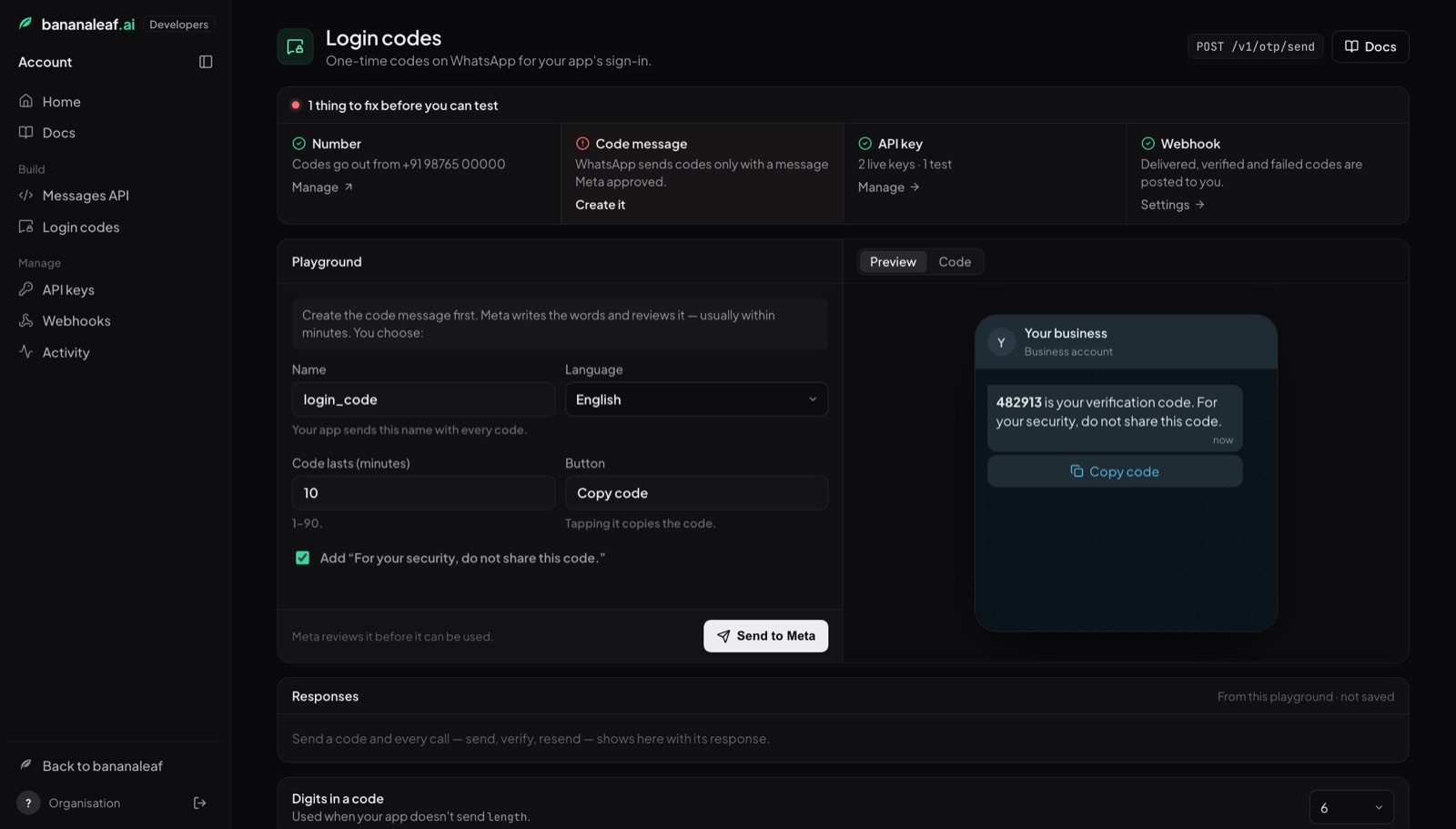
Approval usually takes a few minutes. While Meta reviews it the playground says so, and Check with Meta now refreshes it. If Meta rejects it, its reason is shown and you can create another. New code message (top of the playground) adds more later — your app names the one it wants on every call.
Try it on your phone
Once the code message is approved, enter your own WhatsApp number and press Send code. Type the code you receive and press Verify — the same path your app will use. Resend appears after 30 seconds (twice at most); each resend is a new code and the old one stops working.
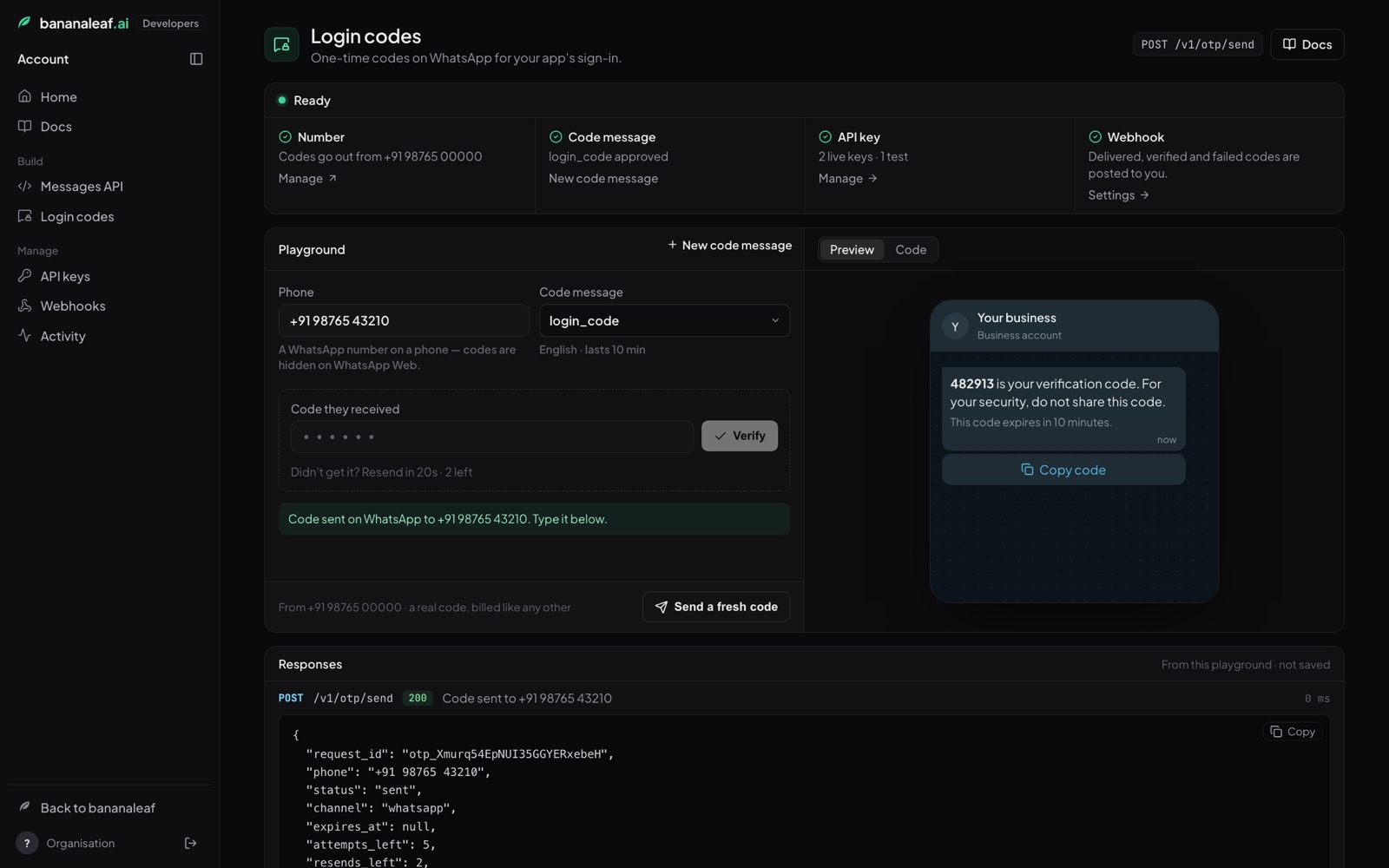
Code (right-hand side) shows the three calls — send, verify, resend — in cURL, Node.js or Python, filled in with your template and the request you just made. Responses lists every call with the JSON your server would get back.
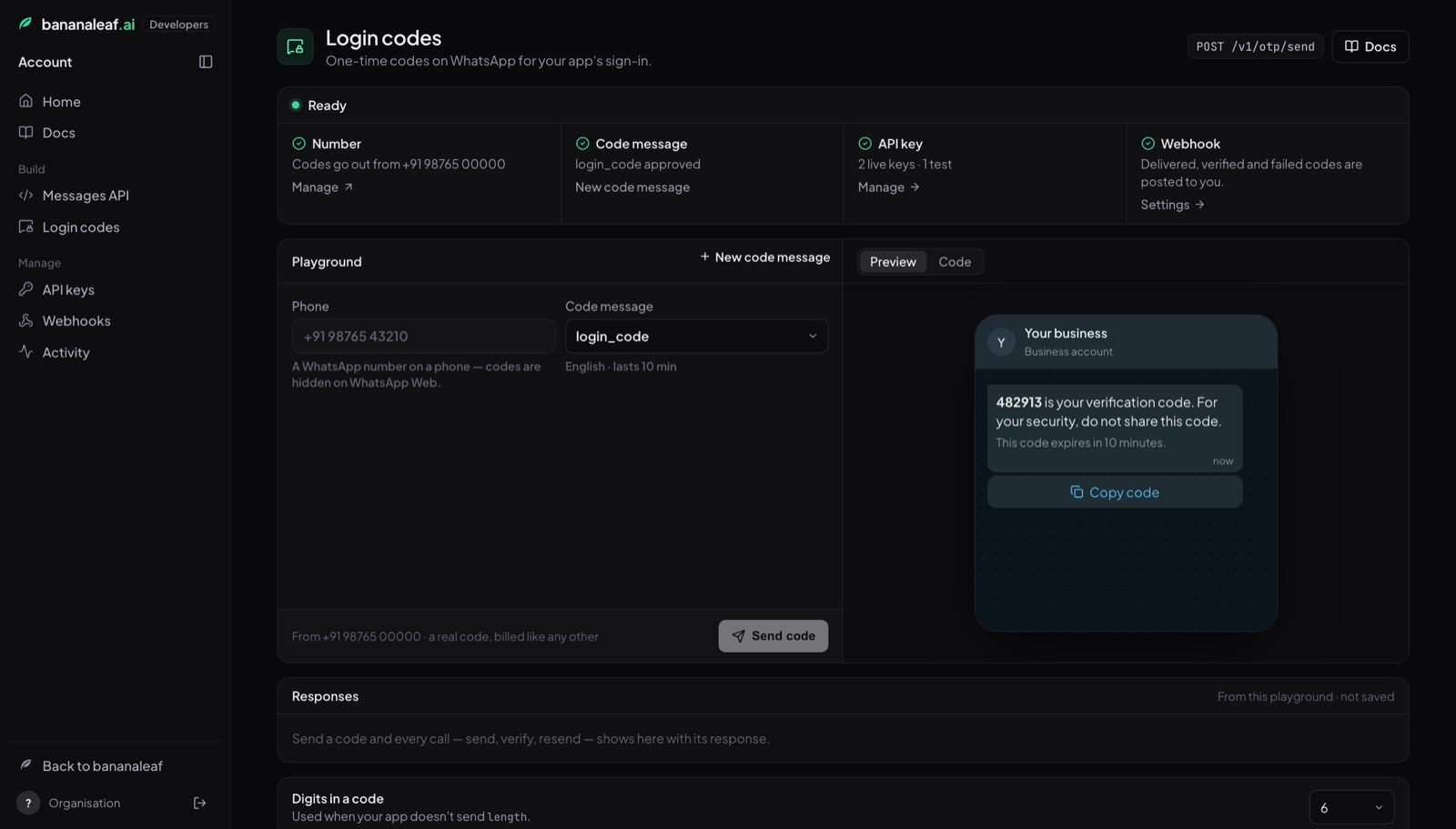
Digits in a code (under the playground) is the length used when your app
doesn't send length.
API keys, webhooks and activity
- Manage → API keys — create, copy and revoke keys. One key works for both login codes and the WhatsApp API. Keys made before 15 October 2026 have no copy button: only a fingerprint of them was ever kept; create a new one if you've lost it.
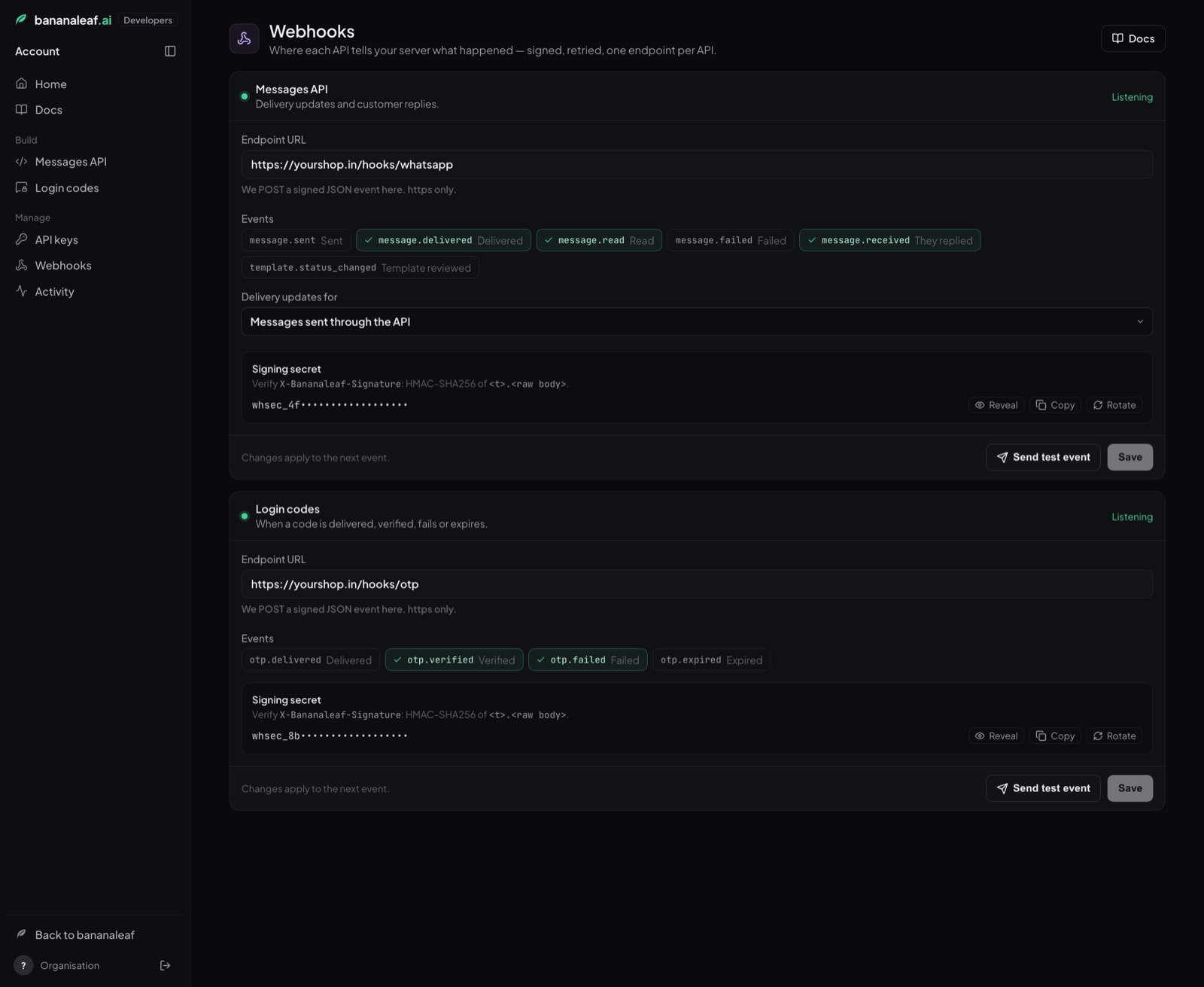
- Manage → Webhooks — your server's URL, the events you want and the signing secret (see Webhooks).
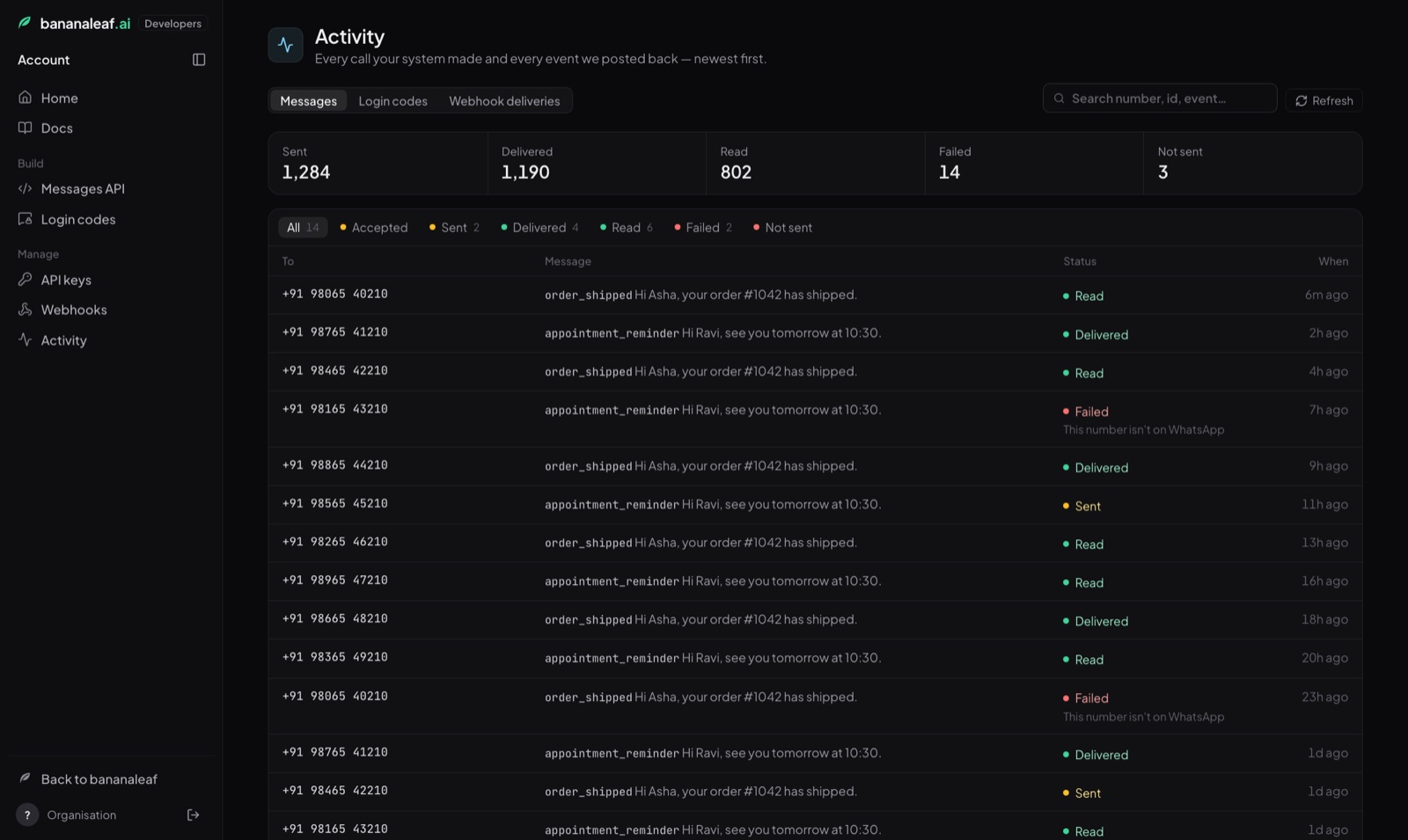
- Manage → Activity → Login codes — the last 14 days: codes sent, delivered and verified, the verified rate and the spend, and every code with its status. Click a row for the full record.
2. Your API key
Authorization: Bearer bl_live_ab12cd34_xxxxxxxxxxxxxxxxxxxxxxxxxxxxxxxxxxxxxxxx| Key | Starts with | What it does |
|---|---|---|
| Live | bl_live_ |
Sends real WhatsApp codes. Billed. |
| Test | bl_test_ |
Goes through every check and limit but sends nothing. The code is always all zeros (000000, or 0000 for length 4). Works even before Meta approves your template. |
- You can copy a key again under Developers → API keys any time. It is stored encrypted, and every copy is recorded. Keys made before 15 October 2026 can't be copied again.
- Revoke a key on the same page; anything using it stops working immediately.
- An account can hold up to 10 active keys — e.g. one per app or environment.
- A missing, wrong or revoked key gets
401with{"detail": "Invalid or missing API key."}.
Keep the key on your server. Never put it in a website's JavaScript or a mobile app. Anyone who finds it can send codes to strangers from your number, and Meta locks WhatsApp numbers that are used that way.
3. The login flow
- The person enters their phone number in your app. Your server calls
POST /v1/otp/sendwith the number and your template's name, and keeps therequest_idit gets back (in the user's session, not in the browser). - They receive the code on WhatsApp and type it into your app. Your server
calls
POST /v1/otp/verifywith therequest_idand the code. - If the reply says
"verified": true, the number is theirs — log them in. The reply'sphoneis the verified number; use that, not the number the browser sent. - Didn't get it? Show a Resend button after 30 seconds. It calls
POST /v1/otp/resend— a new code; the previous one stops working. Twice at most. - (Optional) If another of your services must confirm the login, hand it the
tokenfrom step 3; it callsPOST /v1/otp/token/verifyonce to get the phone back.
4. Endpoints
POST /v1/otp/send — send a code
Request
| Field | Type | Required | Notes |
|---|---|---|---|
phone |
string | yes | Full international number: +919876543210. Spaces, dashes and brackets are ignored; 00 prefix is accepted. A number without a country code is refused. |
template |
string | yes | The name of your approved code template, e.g. login_code. Always required — your app chooses which message is sent. |
language |
string | no | Only checks the template's language (e.g. en_US). Leave it out normally. |
length |
integer | no | Digits in the code, 4–8. Default 6 (changeable under Build → Login codes → Digits in a code). |
expiry_minutes |
integer | no | 1–90. Ignored when the template has its own expiry line — the message tells the person when the code expires, so the code always matches it. |
client_ip |
string | no | The end user's IP as your server saw it. Turns on a per-IP limit (20 codes an hour). |
metadata |
object | no | Up to 20 keys of your own (e.g. {"user_id": "u_42"}), echoed back in webhooks. |
Header (optional): Idempotency-Key: <your unique id> — if your server
retries the same send within 10 minutes, you get the same request back and
no second message goes out. Reusing the key for a different phone is 409.
Reply 200
{
  "request_id": "otp_Xmurq54EpNUI35GGYERxebeH",
  "phone": "+919876543210",
  "status": "sent",
  "channel": "whatsapp",
  "expires_at": "2026-10-14T11:20:00+00:00",
  "attempts_left": 5,
  "resends_left": 2,
  "delivered_at": null,
  "verified_at": null,
  "error": null,
  "test": false,
  "created_at": "2026-10-14T11:10:00+00:00"
}
Examples
curl -X POST https://api.bananaleaf.ai/v1/otp/send \
  -H "Authorization: Bearer $BANANALEAF_KEY" -H "Content-Type: application/json" \
-d '{"phone": "+919876543210", "template": "login_code"}'// Node.js 18+
const res = await fetch("https://api.bananaleaf.ai/v1/otp/send", {
method: "POST",
headers: { Authorization: `Bearer ${process.env.BANANALEAF_KEY}`, "Content-Type": "application/json" },
body: JSON.stringify({ phone: "+919876543210", template: "login_code" }),
});
const { request_id } = await res.json();import os, requests
H = {"Authorization": f"Bearer {os.environ['BANANALEAF_KEY']}"}
r = requests.post("https://api.bananaleaf.ai/v1/otp/send", headers=H,
json={"phone": "+919876543210", "template": "login_code"})
request_id = r.json()["request_id"]POST /v1/otp/verify — check the code
Request
| Field | Type | Required | Notes |
|---|---|---|---|
request_id |
string | yes | From send. |
code |
string | yes | What the person typed, 4–8 digits. |
Reply 200 — right code
{
  "verified": true,
  "request_id": "otp_Xmurq54EpNUI35GGYERxebeH",
  "phone": "+919876543210",
  "verified_at": "2026-10-14T11:11:02+00:00",
  "token": "eyJhbGciOiJIUzI1NiIs…",
  "token_expires_in": 300
}
Reply 200 — wrong code (not an error; show it to the person)
{ "verified": false, "request_id": "otp_…", "attempts_left": 4 }After 5 wrong codes the request is dead (429 too_many_attempts); start
again with send. A code can be verified once — a second verify is
409 already_verified.
curl -X POST https://api.bananaleaf.ai/v1/otp/verify \
  -H "Authorization: Bearer $BANANALEAF_KEY" -H "Content-Type: application/json" \
-d '{"request_id": "otp_Xmurq54EpNUI35GGYERxebeH", "code": "482913"}'POST /v1/otp/resend — a new code
Request: {"request_id": "otp_…"}
- A new code is sent; the previous one stops working.
- The expiry restarts and wrong-code attempts reset to 5.
- At least 30 seconds after the last send (
429 resend_too_soonwithretry_after), and twice at most per request (429 resend_limit).
Reply 200: the same shape as send, with resends_left counting down.
curl -X POST https://api.bananaleaf.ai/v1/otp/resend \
  -H "Authorization: Bearer $BANANALEAF_KEY" -H "Content-Type: application/json" \
-d '{"request_id": "otp_Xmurq54EpNUI35GGYERxebeH"}'POST /v1/otp/token/verify — redeem the proof (optional)
For when one service checks the code and another does the login. The token
from a successful verify is a signed proof, valid 5 minutes, usable once.
Request: {"token": "eyJ…"} — any key of the same Bananaleaf account
may redeem it.
Reply 200
{ "valid": true, "phone": "+919876543210", "request_id": "otp_…", "verified_at": "…" }A second redeem is 409 token_used; an old one is 410 token_expired;
anything else is 401 invalid_token.
GET /v1/otp/{request_id} — status
Returns the same shape as send, current: status is one of sent,
delivered, read, verified, expired, failed. Handy for debugging; you
don't need it for logins.
5. Rules and limits
| Rule | Value |
|---|---|
| Code length | 4–8 digits, default 6, random for every code |
| Code lifetime | The template's expiry (1–90 min), else expiry_minutes, else 10 min |
| Undelivered codes | WhatsApp drops a code it couldn't deliver within its lifetime (max 15 min), so nobody receives a dead code |
| Wrong codes | 5 per request |
| Resends | 2 per request, 30 s apart |
| Codes to one number | 3 per 10 minutes, 6 per hour |
| Codes per end-user IP | 20 per hour (only when you send client_ip) |
| Calls per API key | 60 per minute |
| Codes per account | 500 per hour. Past that, sending pauses for an hour (503 otp_paused) and your account's admins get a push and an email — a sudden flood is almost always a leaked key, and it protects your number from being locked by Meta |
| Request history | 7 days |
Every 429 carries retry_after (seconds) in the body and a Retry-After
header.
6. Errors
Errors from the OTP API look like this:
{ "error": "resend_too_soon", "message": "Wait a little before resending.", "retry_after": 18 }Use error in your code; message is plain English you may show. Two
exceptions come from the web framework itself and use its shape: a bad API key
(401 {"detail": "Invalid or missing API key."}) and a malformed body, e.g. a
missing phone (422 {"detail": [ … ]}).
| HTTP | error |
What it means | What to do |
|---|---|---|---|
| 400 | invalid_phone |
Not a full international number | Ask for the number with country code |
| 400 | template_required |
No template in the call. The reply lists your approved templates in templates |
Add "template": "<name>" |
| 400 | invalid_length · invalid_expiry · invalid_code · invalid_channel |
A value is out of range | Fix the request |
| 402 | insufficient_balance |
WhatsApp balance too low | Top up in Bananaleaf |
| 404 | template_not_found |
No code template with that name | Check the name under Build → Login codes |
| 404 | language_not_found |
The template has no version in that language (reply lists languages) |
Drop language, or use one listed |
| 404 | not_found |
Unknown request_id (or another account's) |
Start again with send |
| 409 | template_not_approved |
Meta hasn't approved the template yet | Wait, or use a test key meanwhile |
| 409 | template_ambiguous |
The same template name exists on two of your WhatsApp numbers and neither is the default | Rename one |
| 409 | already_verified |
That code was already used | Start again with send |
| 409 | idempotency_key_reused |
Same Idempotency-Key for a different phone |
Use a new key per send |
| 409 | token_used |
The proof token was already redeemed | — |
| 410 | expired |
The code ran out of time | Start again with send |
| 410 | failed |
The code was never delivered | Start again with send |
| 410 | token_expired |
The proof token is older than 5 minutes | Verify again |
| 401 | invalid_token |
Not a token from your account | — |
| 422 | not_on_whatsapp |
The number can't receive WhatsApp messages | Tell the person |
| 422 | test_number |
A reserved test-range number | Use a real number |
| 429 | rate_limited |
Too many codes to this number / IP / key | Wait retry_after |
| 429 | recipient_rate_limited |
WhatsApp is limiting messages to this number | Wait a little |
| 429 | resend_too_soon |
Resend within 30 s | Wait retry_after |
| 429 | resend_limit |
Two resends used | Start again with send |
| 429 | too_many_attempts |
Five wrong codes | Start again with send |
| 500 | template_misconfigured |
The template and the message don't match | Contact us |
| 502 | send_failed |
WhatsApp didn't accept the message | Retry once; contact us if it persists |
| 503 | otp_paused |
The hourly cap tripped — sending is paused for an hour | Check your keys haven't leaked |
| 503 | throughput_limited |
WhatsApp's sending speed limit for your number | Retry shortly |
| 503 | whatsapp_disconnected |
Your WhatsApp connection needs reconnecting | Reconnect in Bananaleaf |
| 503 | whatsapp_account_locked · number_quality_blocked |
Meta has restricted your number | Contact us |
7. Webhooks (optional)
You don't need webhooks to log people in — verify tells you everything. They
are for dashboards and support: we POST to your URL when a code is
delivered, verified, failed or expired.
Set the URL under Developers → Webhooks (the Login codes card). It must be https:// on a public address. Tick the events you want,
press Save, and the card shows your signing secret (whsec_…). Send
test event posts an otp.test event to your URL right away; Rotate
replaces the secret.
The request we send
POST /your/webhook HTTP/1.1
Host: yourapp.com
Content-Type: application/json
User-Agent: Bananaleaf-OTP-Webhooks/1
X-Bananaleaf-Signature: t=1760440262,v1=5f2b9a0c…c9

{"channel":"whatsapp","created_at":"2026-10-14T11:10:00+00:00","delivered_at":"2026-10-14T11:10:03+00:00","error":null,"event":"otp.verified","metadata":{"user_id":"u_42"},"phone":"+919876543210","request_id":"otp_Xmurq54EpNUI35GGYERxebeH","sent_at":"2026-10-14T11:10:41+00:00","status":"verified","verified_at":"2026-10-14T11:10:41+00:00"}
The body is compact JSON with its keys in alphabetical order. Check the signature against the raw bytes you received, before parsing them.
The events
event |
Sent when | status in the body |
|---|---|---|
otp.delivered |
WhatsApp confirms the code reached the person's phone. Once per code — a later read receipt doesn't send it again. | delivered (or read, if the read receipt arrived first) |
otp.verified |
Your server called verify with the right code. |
verified |
otp.failed |
WhatsApp refused the message, or reported it couldn't deliver it. error says why. |
failed |
otp.expired |
The code's lifetime ran out before it was verified. | expired |
otp.test |
You pressed Send test event under Developers → Webhooks. | test |
A code that is verified is never also reported as expired; a resend doesn't
send events of its own (the request keeps its request_id).
The fields
| Field | Type | What it is |
|---|---|---|
event |
string | One of the events above. |
request_id |
string | The code request, as returned by send. Use it to match the event to your login attempt. |
phone |
string | The number the code was sent to, + and digits. |
status |
string | The request's status when the event happened: sent, delivered, read, verified, expired, failed (or test). |
channel |
string | whatsapp. |
error |
string or null | On otp.failed, the reason as an error code — e.g. not_on_whatsapp, recipient_rate_limited, send_failed, whatsapp_account_locked. Otherwise null. |
metadata |
object | Whatever you passed as metadata to send (empty object if nothing). |
delivered_at |
string or null | When WhatsApp delivered it (ISO 8601, UTC). |
verified_at |
string or null | When it was verified. |
created_at |
string | When send was called. |
sent_at |
string | When this event happened. A retry carries the same value; only the signature's t is new. |
One example of each
otp.delivered
{
  "event": "otp.delivered",
  "request_id": "otp_Xmurq54EpNUI35GGYERxebeH",
  "phone": "+919876543210",
  "status": "delivered",
  "channel": "whatsapp",
  "error": null,
  "metadata": { "user_id": "u_42" },
  "delivered_at": "2026-10-14T11:10:03+00:00",
  "verified_at": null,
  "created_at": "2026-10-14T11:10:00+00:00",
  "sent_at": "2026-10-14T11:10:03+00:00"
}
otp.verified
{
  "event": "otp.verified",
  "request_id": "otp_Xmurq54EpNUI35GGYERxebeH",
  "phone": "+919876543210",
  "status": "verified",
  "channel": "whatsapp",
  "error": null,
  "metadata": { "user_id": "u_42" },
  "delivered_at": "2026-10-14T11:10:03+00:00",
  "verified_at": "2026-10-14T11:10:41+00:00",
  "created_at": "2026-10-14T11:10:00+00:00",
  "sent_at": "2026-10-14T11:10:41+00:00"
}
otp.failed
{
  "event": "otp.failed",
  "request_id": "otp_7hQm2LkVc9RtYw3ZpN8sDfEa",
  "phone": "+918800123456",
  "status": "failed",
  "channel": "whatsapp",
  "error": "not_on_whatsapp",
  "metadata": {},
  "delivered_at": null,
  "verified_at": null,
  "created_at": "2026-10-14T11:20:00+00:00",
  "sent_at": "2026-10-14T11:20:02+00:00"
}
otp.expired
{
  "event": "otp.expired",
  "request_id": "otp_Lk3pQ8vNw2XyZa7RtB5cMdHe",
  "phone": "+919008055432",
  "status": "expired",
  "channel": "whatsapp",
  "error": null,
  "metadata": { "user_id": "u_77" },
  "delivered_at": "2026-10-14T11:30:04+00:00",
  "verified_at": null,
  "created_at": "2026-10-14T11:30:00+00:00",
  "sent_at": "2026-10-14T11:40:01+00:00"
}
otp.test — from Send test event under Developers → Webhooks; only these fields:
{
  "event": "otp.test",
  "request_id": "otp_test",
  "phone": "+910000000000",
  "status": "test",
  "sent_at": "2026-10-14T11:45:00+00:00"
}
The code itself is never in a webhook.
Check the signature
HMAC-SHA256 of "<t>.<raw body>" with your secret,
and reject anything older than 5 minutes:
import crypto from "node:crypto";
function verifyBananaleaf(rawBody, header, secret) {
  const parts = Object.fromEntries(header.split(",").map((p) => p.split("=")));
  if (Math.abs(Date.now() / 1000 - Number(parts.t)) > 300) return false;
  const expected = crypto.createHmac("sha256", secret).update(`${parts.t}.${rawBody}`).digest("hex");
  return crypto.timingSafeEqual(Buffer.from(expected), Buffer.from(parts.v1 || ""));
}import hmac, hashlib, time
def verify_bananaleaf(raw_body: bytes, header: str, secret: str) -> bool:
parts = dict(p.split("=", 1) for p in header.split(","))
if abs(time.time() - int(parts["t"])) > 300:
return False
expected = hmac.new(secret.encode(), f"{parts['t']}.".encode() + raw_body, hashlib.sha256).hexdigest()
return hmac.compare_digest(expected, parts.get("v1", ""))Answering, and retries
Answer with any 2xx within 10 seconds. Anything else is retried
after 10 s, 1 min, 5 min, 30 min, 2 h and 6 h, then dropped. An event is sent at
most once per code per type, but a retry can arrive after a later event — order
by the timestamps, not by arrival.
8. Testing without sending
Create a test key (bl_test_…) under Developers → API keys:
- every rule and limit applies, but nothing is sent and nothing is billed;
- the code is always zeros (
000000); - it works while your template is still in Meta's review (the template must exist);
- webhooks still fire, so you can test those too.
Switch to a live key when you go live — no other change.
9. Complete example
We have a complete, working login built on this API (Node.js + Express, users and sessions in SQLite — phone → code → logged in, with resend, logout and 14 tests); ask us for it. The core of it:
// POST /auth/start  — send the code, remember the request on the server side
app.post("/auth/start", async (req, res) => {
  const r = await otp("/v1/otp/send", { phone: req.body.phone, template: "login_code", client_ip: req.ip });
  req.session.otp = { requestId: r.request_id, phone: r.phone };   // NOT in the browser
  res.json({ phone: r.phone, resends_left: r.resends_left });
});

// POST /auth/verify — check the code, log in the number WE were told is verified
app.post("/auth/verify", async (req, res) => {
  const p = req.session.otp;
  const v = await otp("/v1/otp/verify", { request_id: p.requestId, code: req.body.code });
  if (!v.verified) return res.status(401).json({ attempts_left: v.attempts_left });
  const user = await users.findOrCreateByPhone(v.phone);           // v.phone, not req.body
  req.session.userId = user.id;
  delete req.session.otp;
  res.json({ user });
});

// POST /auth/resend
app.post("/auth/resend", async (req, res) => {
  const r = await otp("/v1/otp/resend", { request_id: req.session.otp.requestId });
  res.json({ resends_left: r.resends_left });
});

async function otp(path, body) {
  const res = await fetch(`https://api.bananaleaf.ai${path}`, {
    method: "POST",
    headers: { Authorization: `Bearer ${process.env.BANANALEAF_KEY}`, "Content-Type": "application/json" },
    body: JSON.stringify(body),
  });
  const data = await res.json();
  if (!res.ok) throw Object.assign(new Error(data.message || data.detail), { status: res.status, code: data.error });
  return data;
}10. Security checklist
- The API key lives in your server's environment, never in a browser or app.
- The
request_idis kept server-side (session or a signed, httpOnly cookie) — not something the browser can swap. - You log in the
phonefrom the verify reply, not the one the browser sent. - You pass
client_ipso one visitor can't fire codes at many numbers. - Your own login endpoints are rate-limited too.
- Webhook signatures are checked, and old timestamps rejected.
- A leaked key is revoked at once (Developers → API keys → Revoke).
11. Pricing
Each delivered code is billed: Meta's authentication price for the recipient's country plus a small Bananaleaf fee (in India about ₹0.22 per code). A code sent to another country from an Indian number is billed at Meta's higher authentication-international price for that country. Codes that fail, and everything sent with a test key, are free. Charges come out of your WhatsApp balance; Developers → Activity → Login codes shows the spend.
12. FAQ
The code didn't arrive on my laptop. Login codes are delivered only to the phone itself; WhatsApp Web and Desktop show them hidden.
Can I send a code to my business's own WhatsApp number? No — a number can't message itself.
Can the code autofill? On iPhones with iOS 26 or later, the keyboard offers the code from the notification automatically. Android one-tap/zero-tap autofill is not available yet.
Can I change the wording? No — Meta fixes it. You choose the language, the expiry line, the safety line and the button label.
One template in two languages? Create one per language with its own name
(login_code, login_code_hi) and send the one that matches the person.
What happens if the same person asks again before using the first code?
Call send again — that's a new request with a new code; the old one simply
expires. Use resend when you want the same request (and its limits).